The aroma of perfectly cooked meat is a delight, but achieving that ideal internal temperature often means hovering over your grill or smoker. Bluetooth meat thermometers offer unparalleled convenience, allowing you to monitor your cook from a distance. However, the excitement can quickly fade when signal dropouts limit your freedom. As someone with over a decade of experience in testing and evaluating countless meat thermometers, I understand the frustration of a weak signal. This article will delve into the factors that restrict your Bluetooth thermometer’s range and, more importantly, equip you with proven strategies to extend its reach, ensuring your culinary creations are always spot-on.
Understanding Bluetooth Meat Thermometers: Basics and Benefits
A Bluetooth meat thermometer is a smart cooking tool that uses Bluetooth Low Energy (BLE) technology to communicate wirelessly with a smartphone or a dedicated receiver. Typically, a probe is inserted into the meat, and a small transmitter sends temperature data to your paired device.
The primary benefit is hands-free monitoring. Instead of constantly opening your grill or oven and losing precious heat, you can track the internal temperature of your roast, brisket, or chicken from across the patio, inside your kitchen, or even from another room. This convenience ensures precise cooking, prevents over or undercooking, and ultimately delivers safer, more delicious results. Common types range from fully wireless probes that transmit directly to your phone to systems with a wired probe connected to a Bluetooth-enabled base unit.
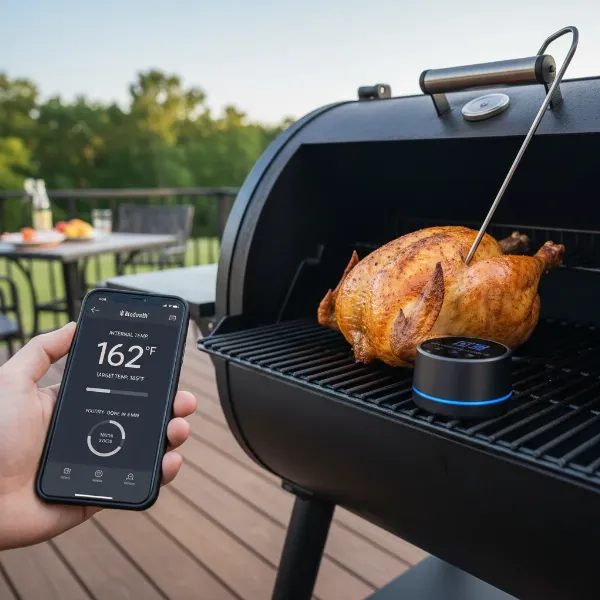 A wireless Bluetooth meat thermometer probe inserted into a roast, with its base unit and a smartphone displaying temperature.
Factors Limiting Your Bluetooth Thermometer’s Range
While the promise of wireless monitoring is enticing, several real-world factors can significantly curtail your Bluetooth thermometer’s effective range, often falling short of the “ideal conditions” advertised. Understanding these limitations is the first step toward overcoming them.
The most obvious factor is physical distance. Bluetooth signals, by nature, have a finite range, typically performing best within 30 to 100 feet in open-air conditions. As you move further away from your grill or smoker, the signal naturally weakens.
Perhaps the biggest culprit in signal degradation is physical obstructions. Walls, especially those made of brick, concrete, or thick stucco, are notorious signal killers. Even common household items like metal appliances (refrigerators, microwaves), dense furniture, and even your own body can absorb or reflect Bluetooth signals, creating “dead zones.” The construction of your grill or oven, particularly thick steel walls, can also act as a Faraday cage, trapping the signal inside.
Wireless interference is another significant challenge. Many household devices, including Wi-Fi routers, cordless phones, and microwave ovens, operate on the same 2.4 GHz frequency band as Bluetooth. This crowded airspace can lead to signal congestion and dropouts, making it difficult for your thermometer and receiver to communicate effectively.
Finally, battery life and overall device health play a crucial role. A low battery on either your thermometer probe or the receiving unit can significantly diminish its Bluetooth transmission power and stability. Just like any electronic device, a well-maintained and fully charged thermometer will perform optimally.
Practical Strategies to Boost Your Thermometer’s Bluetooth Range
Fortunately, you’re not powerless against a finicky Bluetooth signal. By understanding the common limitations, you can employ several practical strategies to significantly extend your thermometer’s range and ensure a consistent connection throughout your cook.
Optimize Placement and Line of Sight
The simplest yet most effective method is to ensure a clear path between your thermometer probe (or its base unit) and your receiving device (smartphone or dedicated receiver).
- Position Strategically: Place the thermometer’s base unit or charger as close as possible to the grill or smoker. If your thermometer has a separate base, keep it elevated off the ground, perhaps on a nearby table or stand, to reduce interference from the ground and give it a better “view” of your device.
- Minimize Obstructions: Identify and remove any immediate physical barriers. If you’re cooking indoors, try to keep the grill or oven (and thus the probe) in the same room or as close as possible to where you’ll be monitoring. Avoid placing large metal objects, thick walls, or even dense plants directly in the signal path. For grills, ensure the receiver isn’t directly behind a thick metal part of the grill.
|
Our Picks for the Best Meat thermometer in 2026
As an Amazon Associate I earn from qualifying purchases.
|
||
| Num | Product | Action |
|---|---|---|
| 1 | TempPro TP829 1000ft Wireless Meat Thermometer Digital for Grilling and Smoking, 4 Meat Probes Grill Thermometer for Outside Grill, BBQ Thermometer for Cooking Food Temperature (Previously ThermoPro) |

|
| 2 | ThermoPro TP03B Digital Meat Thermometer for Cooking, Instant Read Thermometer with Backlight, Kitchen Food Thermometer for Grill Smoker BBQ Oil Deep Fry Candy Bread Coffee with Pop-up Meat Probe |
|
| 3 | Meat Thermometer Digital - Instant Read Food Thermometer for Cooking Grilling, Candy, Air Fryer, Griddle Probe Kitchen Gadgets Essentials BBQ Accessories, Valentines Day Gifts for Him Her, Red |
|
| 4 | Professional Meat Thermometer - Instant Read Food Thermometer with Waterproof Design, Backlight, Hold/Min/Max Function - Cooking Thermometer for Grilling, BBQ, Kitchen Use |
|
| 5 | ThermoPro TP19H Digital Meat Thermometer for Cooking with Ambidextrous Backlit and Motion Sensing Kitchen Cooking Food Thermometer for BBQ Grill Smoker Oil Fry Candy Instant Read Thermometer |
|
| 6 | Ultrean Digital Meat Thermometer for Cooking,Ultra-Fast Instant Read Food Thermometer with Backlight,Foldable Probe,Waterproof Kitchen Thermometer for BBQ,Grill,Fry,Oven,Candy Making |
|
| 7 | 0.5 Sec Instant Read Meat Thermometer Digital with ±0.5℉ Precision, Food Thermometer for Cooking Kitchen Gadgets, Oven Grill Candy BBQ Essentials Accessories, Gifts for Him Dad Men Birthday, Red |
|
| 8 | Alpha Grillers Meat Thermometer Digital - Instant Read Food Thermometer for Cooking and Grilling Gifts for Men Valentines Day Gifts for Him Her Mom Dad |
|
| 9 | Meat Thermometer Digital, Instant Read Meat ThermometerI for Grill and Cooking, Waterproof Food Thermometer for Kitchen and Outside, BBQ, Turkey, Candy, Liquids, Beef |
|
| 10 | Meat Thermometer Digital with 1 Second Instant Read, Large LED Display, Food Thermometer |
|
Leverage a Dedicated Gateway or “Link” Device
Many advanced wireless meat thermometers, such as the MEATER+ or certain ThermoWorks models, offer a clever solution: using a secondary device as a bridge.
- How it Works: These systems often allow an older smartphone or tablet, or a proprietary hub (like the MEATER Block or ThermoWorks RFX Gateway), to act as a Bluetooth-to-Wi-Fi bridge. The probe connects via Bluetooth to this “link” device, which then relays the temperature data over your home’s Wi-Fi network to your primary smartphone. This effectively extends your monitoring range to anywhere you have Wi-Fi access.
- Implementation: Keep the “link” device within close Bluetooth range of the probe, typically right next to the grill. Then, connect both the link device and your primary monitoring device to the same Wi-Fi network. This method dramatically expands your monitoring radius, freeing you from Bluetooth’s inherent distance limitations.
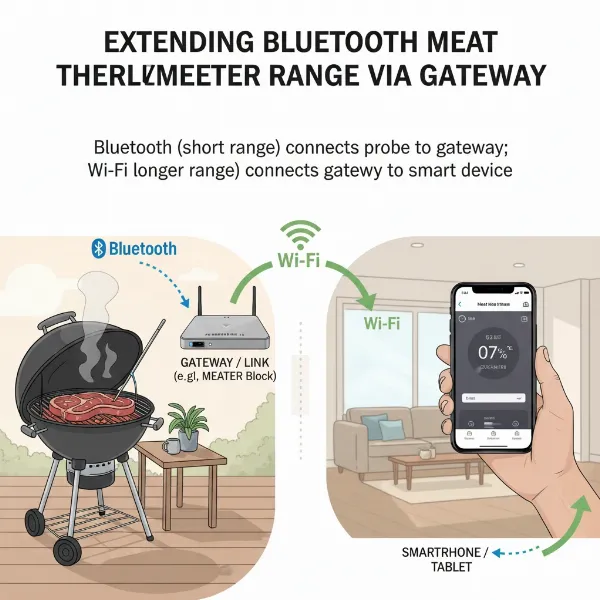 A diagram illustrating a Bluetooth meat thermometer connecting to a gateway device, which then connects to a smartphone via Wi-Fi.
Ensure Optimal Device Power
A common oversight that impacts range is battery level. Bluetooth transmission requires power, and a depleted battery leads to a weaker signal.
- Full Charge is Key: Always ensure your thermometer probe and any associated base units or receivers are fully charged before each use. Many connectivity issues, especially with new devices, stem from insufficient initial charging.
- Check Battery Status: Regularly monitor the battery indicators on your thermometer and receiver. If you notice frequent disconnections, a low battery should be the first thing you check.
Minimize Interference
The 2.4 GHz band is crowded. Reducing interference can significantly improve your signal stability.
- Relocate Interfering Devices: Keep your Wi-Fi router, microwave oven, cordless phones, and other 2.4 GHz devices away from your grill/smoker and your thermometer’s receiver. Even a few feet can make a difference.
- Experiment with Wi-Fi Channels: If possible, try changing the Wi-Fi channel on your router to a less congested one, though this is often a more advanced troubleshooting step.
Advanced Solutions and What to Look for in New Devices
While the practical tips above can enhance your current setup, advancements in technology offer even greater range potential if you’re in the market for a new Bluetooth thermometer.
Bluetooth 5 and Coded PHY
Modern Bluetooth 5 technology introduced a significant feature called Coded PHY (Physical Layer), also known as LE Long Range.
- Benefits: This feature uses Forward Error Correction (FEC) to encode data packets with redundancy, allowing receiving devices to “catch” messages even in noisy environments or over greater distances. While it trades some data throughput for reliability, the range can theoretically increase by up to four times compared to older Bluetooth versions.
- Compatibility: For this to work, both your Bluetooth thermometer and your receiving device (smartphone/tablet) must support Bluetooth 5 and its Coded PHY feature. When purchasing a new thermometer, look for explicit mention of Bluetooth 5 and long-range capabilities.
External Antennas and DIY (with caveats)
For the adventurous and technically inclined, some older wireless BBQ thermometers might allow for DIY antenna modifications.
- Potential, but Risky: Some online guides demonstrate how to replace or extend the internal antenna of a transmitter. While this can improve range, it typically voids warranties, requires specific technical skills, and can potentially damage the device. It’s generally not recommended for the average user.
- Focus on Pre-built Solutions: For most consumers, investing in a thermometer designed with an optimized antenna and robust signal, or one that offers a gateway solution, is a far more reliable and safer approach.
Choosing a Long-Range Bluetooth Thermometer
If extending range is a top priority, consider these features when buying a new device:
- Stated Range: Look for models that explicitly advertise extended ranges (e.g., 150-500+ feet).
- Bluetooth Version: Prioritize thermometers with Bluetooth 5 or newer for potential Coded PHY benefits.
- Gateway/Repeater Options: If you have a large property or significant obstructions, a system that integrates a Wi-Fi gateway or “link” functionality will offer the most robust long-range solution.
Troubleshooting Common Connectivity Issues Beyond Range
Sometimes, the problem isn’t just range, but general connectivity. If you’re still experiencing issues, consider these troubleshooting steps:
- Resetting Devices: A simple power cycle of both your thermometer (and its base) and your smartphone can often resolve temporary glitches.
- Re-pairing Bluetooth Connection: In your smartphone’s Bluetooth settings, try “forgetting” the thermometer device, then initiating the pairing process again from scratch. This forces a fresh connection.
- App Permissions: Ensure the thermometer’s companion app has all necessary permissions enabled on your smartphone, including Bluetooth, Location Services (often required for BLE), and background app refresh.
- Firmware Updates: Check if there are any available firmware updates for your thermometer or app updates for your smartphone. Manufacturers often release updates to improve connectivity and performance.
The pursuit of the perfect cook shouldn’t be hampered by technology. By understanding how Bluetooth thermometers work and applying these practical strategies, you can significantly extend their range, ensuring a consistent connection and the freedom to monitor your meal from wherever you are. Embrace these tips, and enjoy perfectly cooked meat every time!
Frequently Asked Questions
What is the typical range of a Bluetooth meat thermometer?
The typical open-air range for a standard Bluetooth meat thermometer is between 30 to 100 feet (10 to 30 meters). However, this range can be significantly reduced by walls, metal, and other interference in real-world cooking environments.
Can walls really block a Bluetooth thermometer signal?
Absolutely. Walls, especially those made of dense materials like brick, concrete, or even thick wood, can severely block or attenuate Bluetooth signals. Metal appliances, oven doors, and even water in human bodies can also act as significant obstructions.
Is it worth buying a Bluetooth 5 thermometer for range?
Yes, if range is a priority, a Bluetooth 5 thermometer can be a worthwhile investment. Bluetooth 5 introduced features like Coded PHY (LE Long Range) which can theoretically extend the range up to four times compared to older Bluetooth versions, offering more reliable connections over greater distances.
Can I use any old phone as a Bluetooth repeater for my thermometer?
Some specific smart thermometer brands (like MEATER) offer a “Link” feature where you can use an old smartphone or tablet as a Bluetooth-to-Wi-Fi bridge to extend range. However, this functionality is dependent on the thermometer’s design and its companion app; it’s not a universal feature for all Bluetooth thermometers.
How do I know if my thermometer’s battery is affecting its range?
A low battery is a common cause of range and connectivity issues. Most Bluetooth thermometers have a battery indicator in their app. If your thermometer frequently disconnects or struggles to pair, especially when the battery level is low, a full recharge is the first troubleshooting step to take.